
How to use Tibia Analyzer
In less than a minute you find the best charm for each creature of your hunt. This guide walks you through it — including how to import your own hunt straight from Tibia.
Overview in 3 steps
Add your character and mark the charms you own.
Pick a hunt from the library or import yours from Tibia.
Read the optimal combination: one charm per creature, no repeats.
Step 1
Add your character
In the Characters & Charms tab, create the character with its name, vocation and max HP and mana — these are the basis for Overpower and Overflux. Then turn on the charms you actually own and pick each one's level (5%, 10% or 11% proc chance). Everything is saved in your browser: you only need to do this once.
Step 2
Pick the hunt (or import yours)
You have two paths — use whichever is handier:
Option A · Use a hunt from the library
Open the hunt library, search by place or creature and select it. The HP, ratio and weaknesses of each creature are already filled in — it's the fastest way to start.
Option B · Import YOUR hunt from Tibia
Want the exact numbers of your session? Import straight from the in-game Hunting Analyzer:
- Hunt for at least 15 minutes in the same spot (see the tip just below).
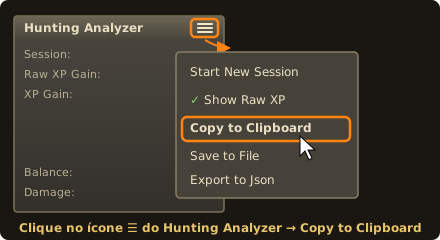
- In Tibia, open the Hunting Analyzer, click the menu icon (☰, the three lines) and choose Copy to Clipboard.
- In the tool, go to My Hunts → Import from Tibia and paste (Ctrl+V) the copied text.
- Review the list, uncheck the creatures that are not part of the hunt and save. HP and weaknesses are pulled from TibiaWiki automatically.
Hunt at least 15 minutes before importing
In the first few minutes the ratio between creatures swings a lot — one respawn more or less already changes the result. Around the 15-minute mark, the hunt's composition stabilizes and starts reflecting the spot's real pace, staying representative for the rest of the session. Importing after that gives the tool the correct weights and a far more reliable charm recommendation.
Step 3
Read the optimal combination
With the active character selected, the tool shows three things: the charms to bring and which creature each one covers; the best charm for each creature, with the damage per proc; and the equivalent alternatives — when another charm gives exactly the same result. Remember: each charm goes on a single creature, none repeated, so the best choice depends on the whole hunt.
🛡️ Creatures outside the bestiary or bosses are flagged as “does not accept a charm” and take up none of your charms.
Frequently asked questions
Why wait 15 minutes before importing?
Because the ratio between creatures only stabilizes after a few respawns. Before that, the calculation can overestimate creatures that showed up by chance. Around 15 minutes, the weights become realistic and hold for the rest of the session.
Do I have to import every time?
No. If the hunt is already in the library, just select it. Import when you want the exact numbers of your session or a hunt that isn't in the library yet.
Is my data saved?
Yes. Characters, charms and your hunts are saved in your browser, no sign-up.
Ready to try it on your next hunt?
Add your character, pick or import the hunt and see the best charm for each creature.
🎯 Open the tool